Awe-Inspiring HD Music Wallpapers Collection for Music Junkies

0

For most of us Music is a driving force in our daily life and geeks certainly love music. No matter what type of music you love, you’ll always find peace in your favorite music. So why not give that same peace and rocking look to your screens with these awe-inspiring HD music wallpapers??? Just go download them and be an awesome music junkie.

As you know we’ve already shared a bunch of beautiful and inspiring wallpaper collections, So be sure to check them out. As this is an HD collection, some wallpapers are pretty huge exceeding 2 MB in size, so it takes some time to load depending on your internet connection speed.

Please do note that, all the wallpapers here are in no particular order, So check out all the wallpapers for maximum return. Now, each wallpaper can be downloaded individually by clicking on the wallpaper and/or if you wish to download them as a pack, you can do so using the download link.

Note: Also note that these wallpapers may vary in size, so you may have to crop or stretch to fit your screen.

Music Wallpapers For Music Junkies

stugon.com-music-wallpapers (1)

stugon.com-music-wallpapers (2)

stugon.com-music-wallpapers (3)

stugon.com-music-wallpapers-4

stugon.com-music-wallpapers (5)

stugon.com-music-wallpapers (6)

stugon.com-music-wallpapers (7)

stugon.com-music-wallpapers (8)

stugon.com-music-wallpapers (9)

stugon.com-music-wallpapers (10)

stugon.com-music-wallpapers (11)

stugon.com-music-wallpapers (12)

stugon.com-music-wallpapers (13)

stugon.com-music-wallpapers (14)

stugon.com-music-wallpapers (15)

stugon.com-music-wallpapers (16)

How To Download All Videos From YouTube Playlist

0

Watching YouTube videos is pretty awesome with all those endless funny, creative and thoughtful videos. Watching YouTube videos on the fly is darn easy but what if you want to watch them offline? Now, you may think why in the world do I need to watch a YouTube video offline.

If that is what you think then there are lots of answers like you may be going offline for a couple of days or you want to use a specific video in your presentations or you just want to download your favorite video to watch in your own convenience.

Downloading a YouTube video is simple when there is only single video, but it becomes harder when you want to download all the videos from a YouTube playlist. So, today stugon is here to share a quick tip on how to download all videos from YouTube playlist.

Download All Videos from YouTube Playlist

The easiest way to download all videos from YouTube playlist is by using a third-party software called Free YouTube Download. This small piece of software is free and extremely easy to use.

You can Download this software using the download link at the bottom of the post and once you have downloaded the free app you can install it like any other software.

However, you should be cautious while installing this free software because it tries to install some bloatware. So, simply decline those bloatware installations [image 1], [image 2].

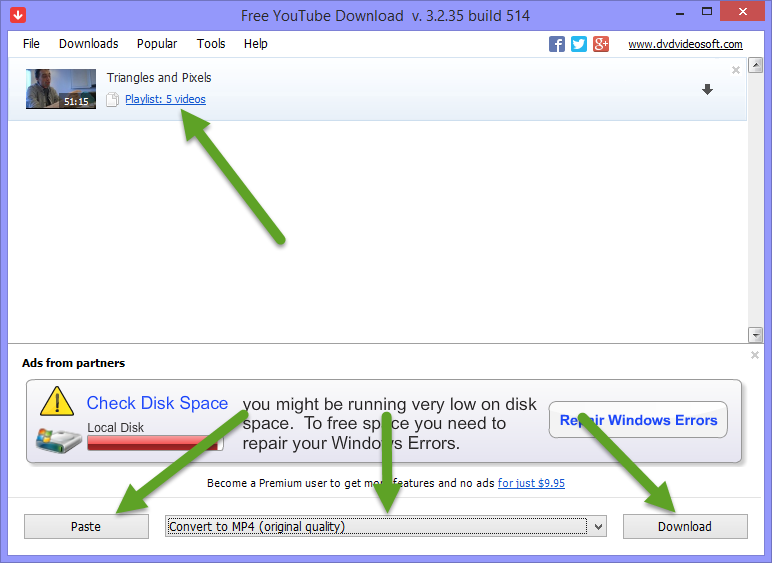
Once you have installed the software, just launch it and copy & paste your YouTube playlist URL into Free YouTube Download. Once you have pasted the YouTube playlist link, FYD will automatically phrase all the videos.

download-youtube-playlist

If you want to customize what videos you want to download then click on the playlist count to select the videos you want to download. Once you have done that, select the video quality and click on the download button to start downloading your favorite YouTube playlist.

Hope that helps and do share your thoughts and any other ways you know to download all videos from YouTube playlist.

Download URL: http://www.dvdvideosoft.com/products/dvd/Free-YouTube-Download.htm

VyprVPN Review: The Best In Class VPN With Stunning Features & Unlimited Download Speeds

0

VPN’s are becoming increasingly popular as more and more people are trying to protect or hide their web traffic data from prying eyes and other disasters. As a matter of fact, If used correctly, VPN’s can do lots of amazing things like lifting up regional restrictions, encrypting your ongoing web traffic, masking your presence on the internet, etc.

VyprVPN is one of the best VPN’s out there with not only stunning features, but which can give you unlimited speeds for your daily downloading and uploading requirements. So without further ado, let us dig into VyprVPN and see why it is one of the best VPN when compared to VPN services out there.

VyprVPN Review – Why Use VyprVPN

To start with, the three main reasons for using a VPN service is to encrypt/protect ongoing web traffic, to access restricted websites and to mask your online presence on the internet. This is where VyprVPN gets into action and can handle all the three things perfectly without any hiccups. Unlike other VPNs, VyprVPN doesn’t need any technical knowledge to get started and won’t bulk your system with heavy UIs and loading stuff but makes your VPN experience smoother and smarter. Apart from protecting your presence while using the internet in your PC, VyprVPN got you covered even when you are using smartphones like Android or iOS.

Installation and Usage

Guys at VyprVPN provided us an account to test and evaluate their services, so I’ve logged into my account and downloaded the VyprVPN desktop client. After downloading, I have installed the client like any other Windows software. After the installation, I’ve launched the program thinking that I have to configure something to get started. But to my surprise, There is no need for any special configurations and if you don’t mind using the default server location then clicking the connect button does the magic.
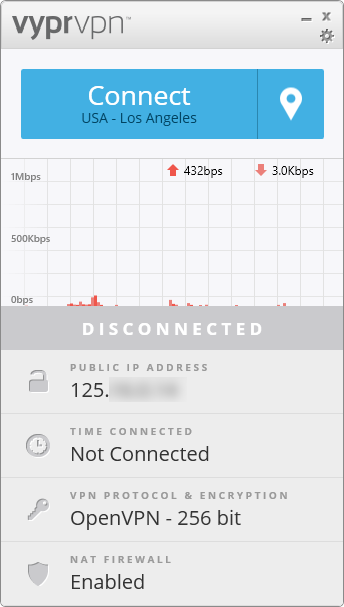
vyprvpn1

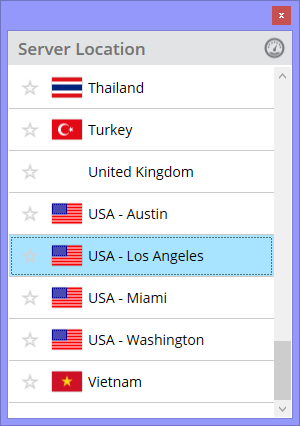
However, If you want to choose or change the location of the VPN server, just click on that little location icon placed next to the connect button and select ‘Show Servers’ option. This will open up the “Server Location” window where you can select your desired server from 40+ locations. Obviously, I had selected USA server and clicked on the connect button so that I can access HULU. For those of you who don’t know, HULU is a regionally restricted video streaming website and only United States citizens can access it.
vyprvpn2

Now the question comes in, to watch any streaming video you need to have a decent speed. To test the download and upload speeds, I’ve used speedtest.net. To my surprise, the downloading and uploading speeds are pretty good (Mind you, I am on a 2Mbps connection at the time of the test). The good thing is that the downloading speed is not only consistent, but VyprVPN delivered what it promised. I’ve seen many VPN’s that fail to deliver even 20% of the local internet connection speed.

vyprvpn3

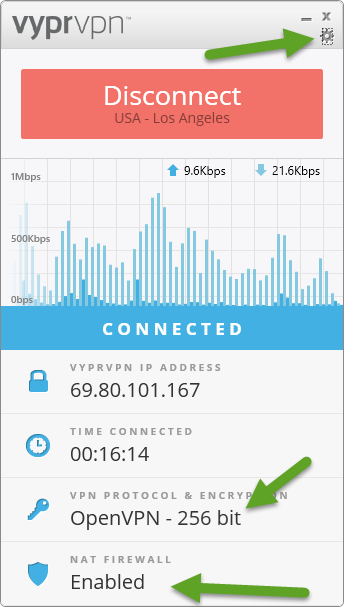
When it comes to security, VyprVPN tightly encrypts your internet connection with OpenVPN – 256-bit encryption and also uses NAT firewall which provides an extra layer of security. If you are an advanced user and want to check out things then you can access VyprVPN’s options panel by clicking on that little gear icon and select options from the list.
vyprvpn4

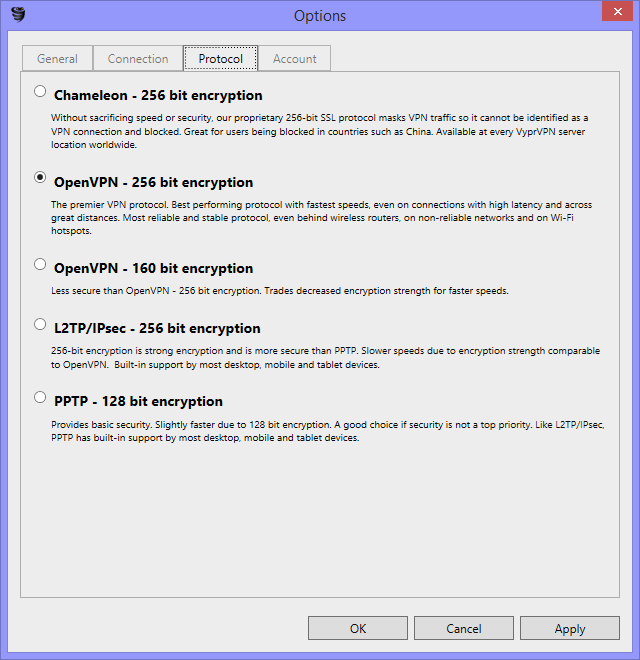
VyprVPN’s options panel is pretty simple and you can easily understand everything around, but the one feature that caught my eye is the Protocol tab. Here you can choose what protocol you want to use if you know what you are doing. I mean if some website is blocking your VPN then you can simply unblock it by using VyprVPN’s proprietary protocol ‘Chameleon’.
vyprvpn5

Last but not least, VyprVPN’s customer service is pretty good, I mean, I’ve contacted their support team using live chat and they responded to my each and every query without any long delays. All in all, VyprVPN has some pretty interesting features and let’s see some of the best VPN features that VyprVPN offers.

Features

  • Unlimited Bandwidth.
  • Unlimited Traffic.
  • Unrestricted download and upload speeds.
  • Dump Truck cloud storage space.
  • Easy-to-use and no-nonsense user interface.
  • VyprVPN writes their own code and maintains their own servers to serve you best.
  • Support for multiple platforms: Windows, Linux, Mac, Android & iOS, DD-WRT.
  • VyprVPN makes it easy to use their service with special applications for Windows, Mac, Android & iOS.
  • Worldwide network with 700+servers and 200,000+ IP address.
  • VyprVPN supports multiple protocols like OpenVPN, L2TP, PPTP and Chameleon.
  • VyprVPN uses Chameleon to defeat VPN blocking.
  • Provides extra layer of security using NAT (Network Address Translation) firewall.
  • Best in class third-party app integration.
  • 24×7 customer services via email & live chat.

To know more about the features offered by VyprVPN, Click here.

Pros

  • Support for multiple devices types.
  • unrestricted speeds and Unlimited bandwidth.
  • Uses its own servers to serve its VPN service.
  • Faster & reliable customer service.
  • Dump Truck cloud storage space.
  • Own worldwide network with 700+servers and 200,000+ IP address.
  • Unlike other VPN’s, VyprVPN writes their own code and maintains their own servers i.e no third-parties included.
  • No hidden fees or forced 3rd party softwares installations (like ask toolbar).
  • Free online resources to help you work with VyprVPN.
  • Free trial period to assess the working of VyprVPN.
  • Best in class protection with tight encryption & NAT.
  • Unblocks restricted websites.

Cons

The one and only con I get is that – Even though VyprVPN supports Linux environment, setting it up may require some technical knowledge. Instructions can be found here.

Conclusion

VyprVPN is a full-fledged VPN service with some pretty interesting features, security and speed to offer. There are lots of other free and premium VPN services that promise to do too much, but VyprVPN is one of the few service’s which deliver what it promises. So, if you haven’t tried VyprVPN then do give it a try as they offer a free trial and you won’t be disappointed with their service. Hope our VyprVPN review helps you choose a better VPN service.

Note: This is a sponsored article. What it means is that we are paid to review this product but the opinions in this article about the product are not affected in any way.

Hidden Secret Unicorn Easter Egg In Firefox

0

The latest firefox release is all the rage now with its new revamped Australis User Interface. Being minimal and eye candy aside, many firefox users are complaining for lack of old features like add-on bar, firefox button, etc (Yep, folks at reddit are getting mad about this).

Which made us to share about the all good Classic Theme Restorer add-on which can restore classic theme in firefox with all the good ol’ features. Being that aside, Firefox 29 has featured an interesting hidden secret Unicorn easter egg in firefox. So without further ado, let’s see how you can reveal the secret of this hidden easter egg.

Secret Unicorn Easter Egg In Firefox

Note: If you need some visual then watch the GIF animation below.

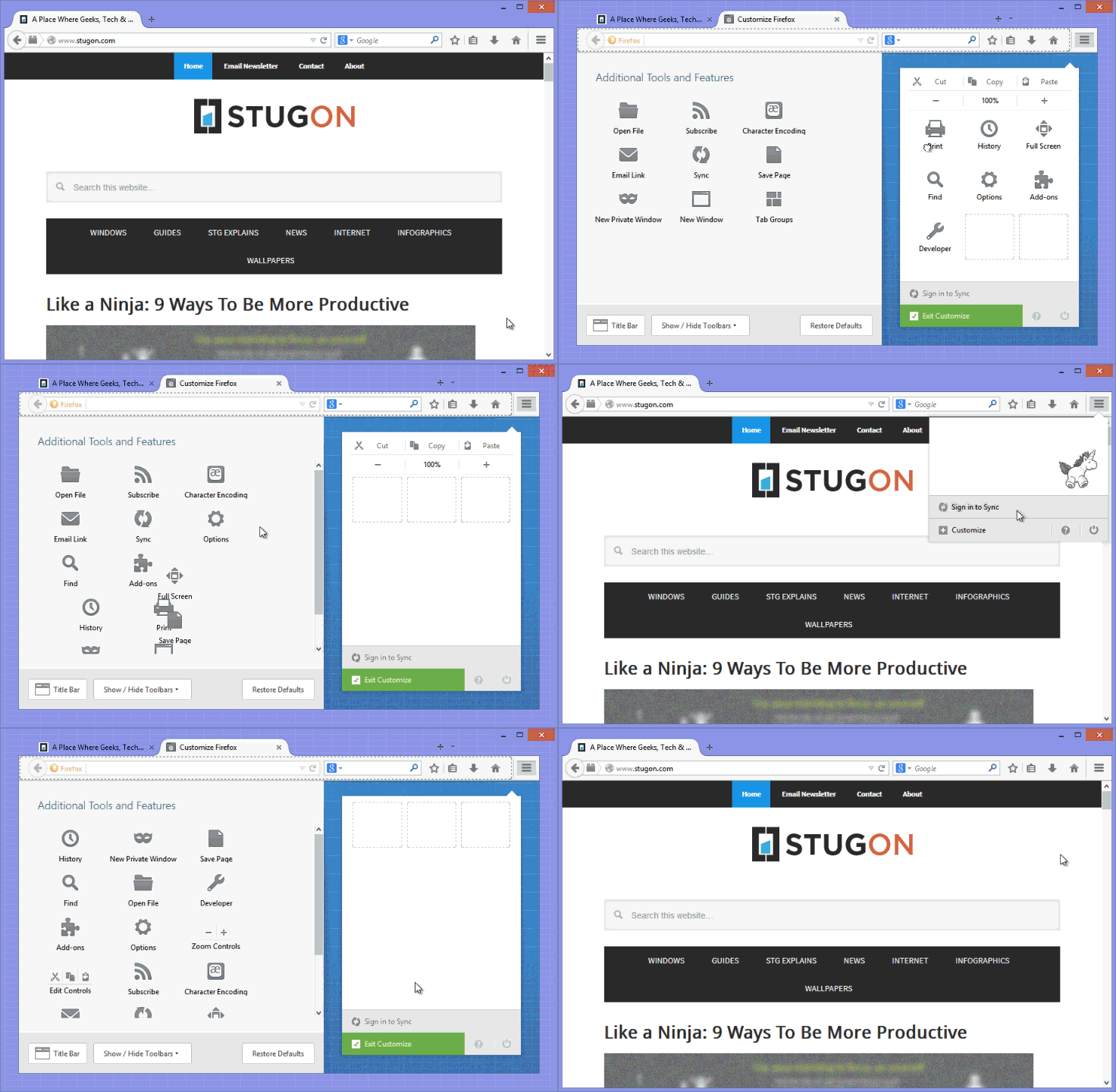
1. To reveal the hidden secret unicorn easter egg in firefox, Just follow the steps and you can enjoy it. First off, launch your firefox browser and click on that menu icon on top-right side.

2. This will open up the firefox menu, here click on +Customize button to open firefox customization menu.

3. Now drag out all the buttons inside the menu including the Zoom and Cut, Copy, Paste buttons. Once you are done dragging out, exit the customization by clicking on Exit Customize button or by pressing the ESC button on your keyboard.

4. Now to see your hidden secret unicorn easter egg in firefox, open up the firefox menu by clicking on the menu button. Tada, you can now see your flying unicorn easter egg. To make it more beautiful, full it will colors by hovering your mouse on the Unicorn.

5. To remove the easter egg, Just restore all your buttons and you are good to go. To make it simple and visual, I’ve made a simple animated gif of the whole process – be advised, the gif is a little over 1MB and may take some time to load depending on your internet connection speed.

unicorn-easteregg-in-firefox

Hope that helps and do share your thoughts on the flying secret unicorn easter egg in firefox.

The Best HD Funny and Humor Wallpapers – Hand Picked Edition

0

Being geeky doesn’t mean that you should stick your face to your desktop screen. As a matter of fact, having a bit of humor brings the world of difference. So, today stugon is here to share some of the best funny and humor wallpapers. Let’s fill our screen with these funny and humor wallpapers.

As you know we’ve already shared a bunch of beautiful and inspiring wallpaper collections, So be sure to check them out. As this is an HD collection, some wallpapers are pretty huge exceeding 1 MB in size, so it takes some time to load depending on your internet connection speed.

Please do note that, all the wallpapers here are in no particular order, So check out all the wallpapers for maximum return. Now, each wallpaper can be downloaded individually by clicking on the wallpaper and/or if you wish to download them as a pack, you can do so using the download link.

Note: Also note that these wallpapers may vary in size, so you may have to crop or stretch to fit your screen.

Download Funny & Geeky Wallpapers

stugon.com-funny-humor-wallpapers (1)

stugon.com-funny-humor-wallpapers (2)

stugon.com-funny-humor-wallpapers (3)

stugon.com-funny-humor-wallpapers (4)

stugon.com-funny-humor-wallpapers (5)

stugon.com-funny-humor-wallpapers (6)

stugon.com-funny-humor-wallpapers (7)

stugon.com-funny-humor-wallpapers (8)

stugon.com-funny-humor-wallpapers (9)

stugon.com-funny-humor-wallpapers (10)

stugon.com-funny-humor-wallpapers (11)

stugon.com-funny-humor-wallpapers (12)

stugon.com-funny-humor-wallpapers (13)

Download Funny & Geeky Wallpapers

Finished Sponsored Giveaway: Internet Download Manager Giveaway Worth $250

0

Downloading files from the internet is never easy unless Internet Download Manger, traditionally we tend to download files from the internet using our native browser download manager. But the fact remains, they are not so advanced and doesn’t have much features which can ensure you the best download experience possible.

Said that the native download managers may also frustrate us while download large files because, the native browser download manager can’t resume a broken download link. As said before, there comes the role of the best download manager ‘Internet Download Manager (IDM)’. So without further ado, let’s see how IDM works and get on with Internet Download Manager giveaway worth $250.

Why Use Internet Download Manager?

As I said before, Internet download manager is that best as it delivers what it says. The power of IDM comes from its features and the power to capture and download almost anything. Unlike other download managers, IDM doesn’t have any unnecessary whistle or bells but comes with all the required and essential features that you’ll ever need as an internet user.

While using IDM, you don’t have to worry about the download speeds or broken links because IDM can take care of these hurdles very easily and can multiply your download speeds for faster downloading experience. Apart from all this, the best thing about IMD is that it does have a free 30-day trial version using which you can feel the power of absolute downloading.

Installation & User Interface

As I said before, IDM has a free 30-day trial version using which you can download and install it like any other software. As soon as the IDM has installed, it will find and integrate will all your browsers so that every download link you click will be captured and downloaded by IDM. Even though it is a trial version, IDM won’t restrict you from enjoying all the features.

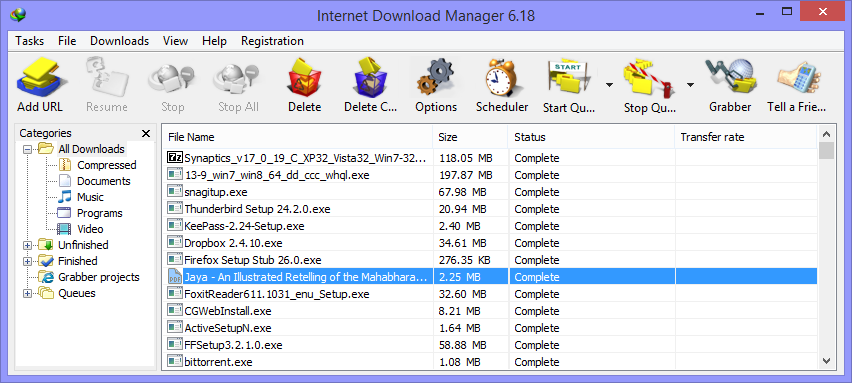
Internet download manager

As you can see from the above image, IDM has a pretty minimal user interface but it does pack a punch. I mean, with IDM you can multiply your download speeds, resume broken downloads, schedule your downloads, etc. Apart from all this, IDM can grab almost all the video and audio files that are playing in your web browser i.e, you can use IDM to download your favorite youtube videos. Below is the list of features provided by internet download manager.

Features

  • Support for all major browsers.
  • seamlessly resume broken download links.
  • Grab video and audio files playing in your browser.
  • Support for automatic antivirus checking.
  • IDM has integrated support for website spider & Grabber.
  • With IDM you can schedule your downloads.
  • Drag and Drop support.
  • and lots more, click here to know more.

Giveaway Rules

First off, we are giving away 10 Internet Download Manager license keys worth $250. To win the giveaway, just follow the steps below and don’t forget to comment as it is mandatory to win the license.

  1. Subscribe to our newsletter
  2. Like us on facebook.

  3. Stugon on Google+

  4. Comment with your valid email address.

After doing all that, just don’t forget to comment below with your valid email address [which you used to subscribe to the newsletter] telling us why you need a powerful download manager like IDM.

This giveaway will be closed on 1st May, 2014 12:30 IST and the winners are selected randomly from the eligible participants.

Note 1: If you have already subscribed to our newsletter, then just do the remaining things and comment below.

Note 2: When we say eligible participants, we are talking about the participants who’ve done all the things that are stated above.

Update On Winners

Thanks for the participation guys, the giveaway has been ended and as promised, here are the winners of Internet Download Manager License Keys Worth $250.

  • Varun
  • Sonia Kumar
  • Hania
  • Beta
  • Mohammod
  • Aftab
  • Ronny Green
  • Neo
  • Asriel Rusdyawan
  • Jay

The winners will receive their genuine IDM license keys within 48 hours and even if you are not a winner, do try IDM as they offer 30-day trial version with all the whistles and bells you need.


Interested in a sponsored giveaway, We’d love to hear from you. Just contact us & we’ll get back to you.

10 Awesomely and Ridiculously Designed Workstation & Office Desks

0

As geeks we spend lots of our time with our workstations and its no wonder that we sometimes eat and sleep right on the desk of our workstations. As a matter of fact, we all do love to keep our workstation desks as geeky as possible because, as some one said, our desk tells a lot about us.

So, if you are thinking to geek up your workstation desks then here are some of the most geeky and ridiculously designed workstations for your inspiration. With ado, let’s look at the big picture and if you have the stand, why not buy these artistic workstations?

Surf Chair

surf-chair

Emperor Workstation

emperor-workstation

Ninja Standing Desk

ninja-standing

Zero Gravity Workstation

zero-gravity

Overbed Workstation

over bet workstation

Car Desk

car-desk

SlatePro Techdesk

slatepro

TrekDesk

trekdesk

Pedal Power

pedal-power

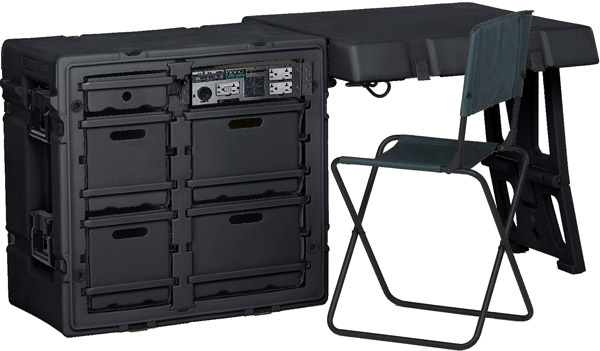
Tactical Desk

tactical

Geeky and Funny Wallpaper Collocation [HD Hand Picked]

Keeping you desktop geeky, funny and creative helps you think geeky and will also inspire you to do the stuff that you want to do. So, as we just ended our weekend why don’t you spice up your desktop or laptop screens with these geeky and funny wallpaper collection? Go ahead and download your favorite geeky and funny wallpapers.

As you know we’ve already shared a bunch of beautiful and inspiring wallpaper collections, So be sure to check them out. As this is an HD collection, some wallpapers are pretty huge exceeding 1 MB in size, so it takes some time to load depending on your internet connection speed.

Please do note that, all the wallpapers here are in no particular order, So check out all the wallpapers for maximum return. Now, each wallpaper can be downloaded individually by clicking on the wallpaper and/or if you wish to download them as a pack, you can do so using the download link.

Note: Also note that these wallpapers may vary in size, so you may have to crop or stretch to fit your screen.

Download Funny Wallpapers

funny-geeky-wallpaper-stugon.com (1)

funny-geeky-wallpaper-stugon.com (2)

funny-geeky-wallpaper-stugon.com (3)

funny-geeky-wallpaper-stugon.com (4)

funny-geeky-wallpaper-stugon.com (5)

funny-geeky-wallpaper-stugon.com (6)

funny-geeky-wallpaper-stugon.com (7)

funny-geeky-wallpaper-stugon.com (8)

funny-geeky-wallpaper-stugon.com (9)

funny-geeky-wallpaper-stugon.com (10)

funny-geeky-wallpaper-stugon.com (11)

funny-geeky-wallpaper-stugon.com (12)

Download Funny Wallpapers

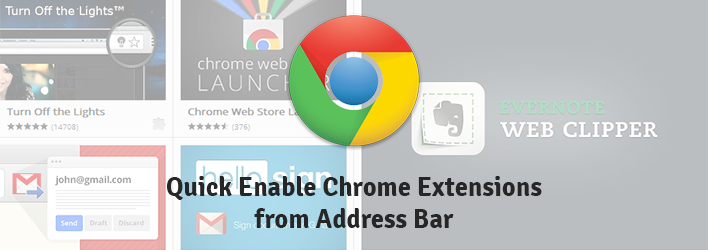
How To Quickly Enable and Disable Chrome Extensions from Omnibar

Its pretty natural that your mouse goes all frenzy to install all the cool chrome extensions in your sight, but as the time goes on it will be a pain in the back to quickly enable and disable them. This is because you just don’t want to use all of them at the same time as these extensions may suck out all the juice left in your PC.

So in this quick tip article, let’s see how you can quickly enable and disable chrome extensions from Omnibar, yes right from your pretty Omnibar (also called as the address bar).

Quickly Enable and Disable Chrome Extensions

To quickly enable and disable chrome extensions right from your omnibar, all you have to do is to download and install two small chrome extensions called Quick Enable and Quick Disable.

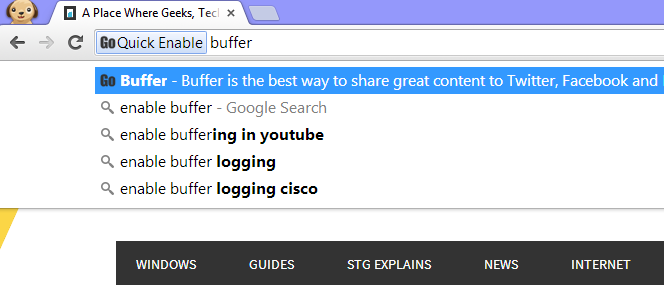
After installation, to quickly enable a chrome extension just type in ‘Enable <keyword>“. For example, if you want to quickly enable your disabled bufferapp extension then just type ‘enable buffer‘ in your omnibar and press enter. This action will be triggered and your extension will be enabled automatically.

quick-enable-chrome-extension

Same way, if you want to disable any enabled extension then type in ‘Disable <keyword>“. For example, to disable the already enabled bufferapp extension, just type ‘disable buffer‘ and press enter.

quick-disable-chrome-extension

Of course you have to install two separate chrome extensions, but they are pretty minimal and won’t come in your way of daily usage. So, it’s that easy to quickly enable and disable chrome extensions right from your address bar.

Finished Sponsored Giveaway: CyberGhost Premium Plus VPN Giveaway Worth $600

0

VPN services like CyberGhost help us a lot by encrypting and securing our internet connecting to the outside world. The best part of VPN is that you can use them to bypass regional restricts placed by some sites like HULU, Netflix, etc.

Said that the fact remains intact, Even though VPN services are here for a while there are not many people who know the awesomeness of VPN services like CyberGhost. Said that CyberGhost is one of the best VPN services out there with promising features and user-friendliness. So, without further ado let’s get on with CyberGhost premium plus VPN giveaway.

Why Use CyberGhost

As I said in my previous article, CyberGhost is one of my favorite VPN service which delivers what it says. I mean, CyberGhost can provide you with the best of both worlds(security & anonymity). CyberGhost VPN service can actively hide your online activity from prying eyes and can also grant you access to blocked & restricted sites. The best thing about CyberGhost is that it does offer a free plan with some interesting features like unlimited bandwidth, ability to choose server location, etc.., which makes it one of the best VPN service with all the whistles and bells you’ll ever need.
Installation and User Interface

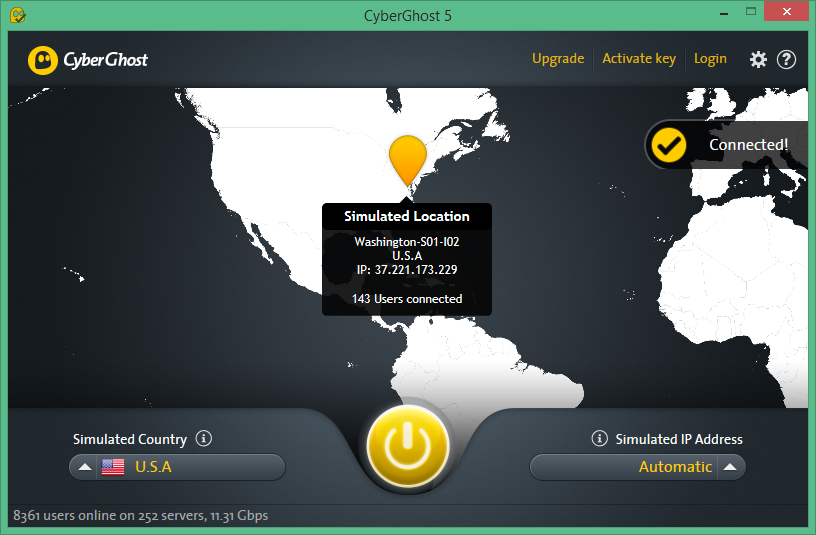
As said before, CyberGhost offers a free plan which you can download and install like any other software. After installing, launch CyberGhost and here as a free user, you can select the simulated country from the left-bottom tab. After selecting the country you need, just click on the big yellow power button to start using CyberGhost. It’s that easy to use CyberGhost, I mean, there is no technical knowledge required.

Cyberghost VPN

As you see, CyberGhost’s user interface is pretty minimal & awesome. The user interface of CyberGhost does not have any clutter and all you have to do some point and click to enjoy the restricted sites while spoofing your original IP address. If you are a premium member of CyberGhost, you’ll have some extra privileges like Unlimited speed, P2P downloading, No wait times, ability to select simulated IP addresses, etc. So what are you waiting for, just download and start using CyberGhost.

Features

  • Unlimited bandwidth.
  • Unlimited traffic.
  • Can choose server locations.
  • Can choose your simulated IP address.
  • 20 VPN servers over 23 countries.
  • Tight encryption with ASE-256bit.
  • Supports OpenVPN, L2TP/IPsec, PPTP protocols via windows client.
  • CyberGhost premium plus VPN supports up to 5 devices.

CyberGhost Premium Plus Giveaway

First off, we are giving away 5 CyberGhost premium plus license keys worth $600. To win the giveaway, just follow the steps below and don’t forget to comment as it is mandatory to win the license. Please wait while the giveaway is loading.

  1. Subscribe to our newsletter
  2. Like us on Facebook.

  3. Stugon in Google+

  4. Comment with your valid email address.

After doing all that, just don’t forget to comment below with your valid email address [which you used to subscribe to the newsletter] telling us why you need a powerful VPN service like CyberGhost.

This giveaway will be closed on 10th Apr 2014 12:30 IST and the winners are select randomly from the eligible participants.

Note: When we say eligible participants, we are talking about the participants who’ve done all the things that are stated above.

Update On Winners

Thanks for the participation guys, the giveaway has been ended and as promised here are the winners of CyberGhost 1 Year Premium Plus License Keys Worth $600.

  • Chad
  • Edemilson
  • Craig Bakers
  • Pankaj
  • Yukselen Degerler

The winners will receive their genuine CyberGhost Premium Plus license key within 48 hours and even if you are not a winner, do try CyberGhost as they offer a decent free plan with all the whistles and bells you need.


Interested in a sponsored giveaway, We’d love to hear from you. Just contact us & we’ll get back to you.